
Vendor Compliance Management Automation Tool in India: Complete Guide for Businesses

Vendor Compliance Management Automation Tool

Managing vendor compliance manually becomes difficult as the number of vendors, contractors, locations, employees, documents, licences, payroll records, audits, and statutory obligations increases.

A Vendor Compliance Management Automation Tool helps businesses automate the monitoring, validation, auditing, and tracking of vendor compliance through a centralised digital platform.

Instead of relying on spreadsheets, emails, shared folders, and manual follow-ups, businesses can use automation to manage vendor onboarding, payroll compliance, statutory records, licences, audits, risk scoring, corrective actions, and compliance dashboards from one system.

What is a Vendor Compliance Management Automation Tool?

A Vendor Compliance Management Automation Tool is software designed to automate vendor and contractor compliance processes.

It can help businesses manage:

  • Vendor onboarding
  • Vendor master data
  • Contractor employee records
  • Attendance
  • Payroll
  • Minimum wages
  • EPF
  • ESIC
  • Professional Tax
  • Labour Welfare Fund
  • Payslips
  • Bank payment proof
  • Statutory registers
  • Contractor licences
  • Returns
  • Compliance documents
  • Vendor audits
  • Risk assessment
  • Audit observations
  • Corrective actions
  • Vendor compliance scoring
  • Multi-location monitoring

The objective is to reduce manual work and provide continuous visibility over vendor compliance.

Why Businesses Need Vendor Compliance Automation

Vendor compliance can involve hundreds or thousands of documents and employee-level records.

Manual processes can create problems such as:

  • Missing vendor documents
  • Expired licences
  • Delayed statutory submissions
  • Minimum wage violations
  • EPF mismatches
  • ESIC mismatches
  • Incorrect payroll
  • Missing payslips
  • Missing bank payment proof
  • Incomplete registers
  • Repeated audit observations
  • Overdue corrective actions
  • Poor vendor risk visibility

Automation helps businesses identify and manage these issues faster.

Key Features of a Vendor Compliance Management Automation Tool

1. Automated Vendor Onboarding

The system should automate vendor registration and onboarding.

It can capture:

  • Vendor name
  • PAN
  • GST
  • Bank details
  • Contact details
  • Registration certificates
  • Labour licences
  • EPF details
  • ESIC details
  • Agreements
  • Insurance

The system can also flag missing documents before vendor activation.

2. Vendor Master Management

A central vendor master can maintain:

  • Vendor code
  • Vendor status
  • Business category
  • Contract period
  • Service type
  • Location
  • Licence details
  • Compliance status
  • Risk category

This creates one reliable source of vendor information.

3. Automated Document Verification

Vendor documents can be checked against mandatory requirements.

The tool can track:

  • Missing documents
  • Expired documents
  • Pending approvals
  • Renewal dates
  • Verification status

Automated alerts reduce manual follow-ups.

4. Licence Expiry Automation

The system should monitor vendor licence validity.

It can automatically trigger alerts for:

  • Licence expiry
  • Contract expiry
  • Insurance expiry
  • Registration renewal
  • Statutory certificate expiry

This helps businesses act before documents become invalid.

5. Contractor Employee Management

The application should maintain worker-level details such as:

  • Employee code
  • Employee name
  • Designation
  • Skill category
  • Date of joining
  • Work location
  • UAN
  • ESIC number
  • Bank details
  • Wage structure

This enables employee-level compliance automation.

6. Automated Attendance Validation

Attendance can be automatically checked against payroll.

The tool can compare:

Attendance → Payable Days → Wage Register → Payslip → Bank Payment

This helps identify:

  • Missing attendance
  • Excess payable days
  • Incorrect leave
  • Overtime mismatches
  • Payroll differences

7. Automated Minimum Wage Validation

The system can compare vendor employee wages with applicable minimum wage rates.

Validation may consider:

  • State
  • Zone
  • Industry
  • Skill category
  • Designation
  • Effective date

Any wage shortfall can be automatically flagged.

8. Automated EPF Compliance Validation

The tool should help verify:

  • UAN
  • PF wages
  • Employee contribution
  • Employer contribution
  • ECR
  • Challan
  • Payment proof

The system can identify mismatches between payroll and EPF records.

9. Automated ESIC Compliance Validation

The application can compare:

  • Employee insurance number
  • ESIC wages
  • Employee contribution
  • Employer contribution
  • Challan
  • Payment proof

Missing or incorrect contribution records can be highlighted automatically.

10. Professional Tax Automation

For applicable States, the system can check:

  • Employee PT slab
  • Deduction
  • Payment
  • Return
  • Due date

This helps improve State-wise payroll compliance.

11. Labour Welfare Fund Automation

The tool can monitor:

  • LWF applicability
  • Employee contribution
  • Employer contribution
  • Frequency
  • Due date
  • Payment proof

12. Automated Payslip Verification

Payslips can be compared against:

  • Attendance
  • Wage register
  • Earnings
  • Deductions
  • Net wages
  • Statutory deductions

Any mismatch can be raised as a compliance observation.

13. Automated Bank Payment Proof Verification

The tool can verify whether employee wages were actually paid.

It can compare:

  • Net payroll
  • Employee bank details
  • Transaction amount
  • Payment date
  • Payment reference

This strengthens payroll audit controls.

14. Automated Statutory Register Validation

The application can validate or generate records such as:

  • Attendance register
  • Wage register
  • Employee register
  • Overtime register
  • Deduction register
  • Contractor register

This reduces duplicate manual entry.

15. Automated Vendor Audit Workflow

The system should support digital vendor audits using configurable checklists.

Audit areas may include:

  • Payroll
  • Attendance
  • Minimum wages
  • EPF
  • ESIC
  • Payslips
  • Payment proof
  • Licences
  • Registers
  • Returns
  • Employee documents

The audit can be automatically assigned based on location, vendor, or period.

16. Automated Audit Observations

When a compliance check fails, the system can automatically generate an observation.

An observation may contain:

  • Vendor
  • Location
  • Compliance category
  • Risk level
  • Observation description
  • Responsible person
  • Due date
  • Supporting evidence

This reduces manual audit administration.

17. Automated Corrective Action Tracking

The tool should allow corrective actions to be assigned automatically.

The workflow may be:

Observation → Action Assigned → Vendor Response → Evidence Upload → Verification → Closure

Overdue actions can trigger escalations.

18. Vendor Risk Scoring Automation

Vendors can be automatically classified as:

  • Low Risk
  • Medium Risk
  • High Risk
  • Critical Risk

Risk scoring can consider:

  • Minimum wage violations
  • Missing EPF
  • Missing ESIC
  • Expired licences
  • Open observations
  • Overdue corrective actions
  • Missing documents
  • Payroll mismatches

This helps management focus on high-risk vendors.

19. Automated Vendor Compliance Score

A compliance score can be calculated based on:

  • Document compliance
  • Payroll compliance
  • EPF compliance
  • ESIC compliance
  • Minimum wage compliance
  • Licence validity
  • Audit performance
  • Corrective-action closure

The score can be updated automatically after every audit or compliance cycle.

20. Vendor Compliance Dashboard

A dashboard can provide real-time visibility over:

  • Total vendors
  • Compliant vendors
  • Non-compliant vendors
  • High-risk vendors
  • Pending audits
  • Open observations
  • Overdue actions
  • Expiring licences
  • Minimum wage issues
  • EPF status
  • ESIC status
  • Vendor compliance scores

Vendor Compliance Automation Workflow

A modern automated workflow can look like:

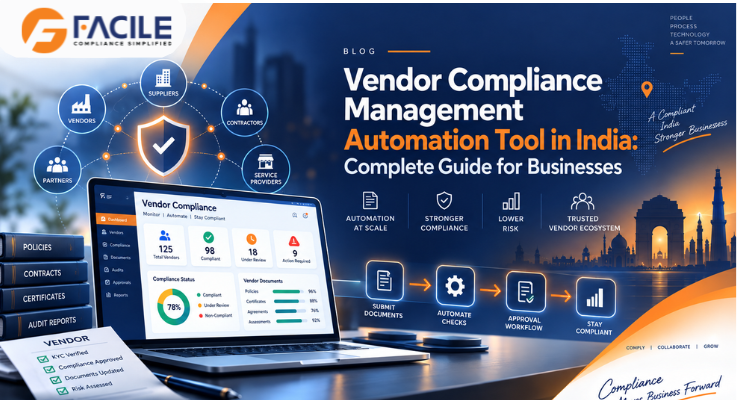
Vendor Onboarding → Document Verification → Employee Mapping → Attendance Upload → Payroll Validation → Statutory Validation → Audit → Risk Score → Corrective Action → Closure

This creates a complete digital compliance trail.

Benefits of Vendor Compliance Management Automation

Reduced Manual Work

Automation reduces dependence on spreadsheets and repeated email follow-ups.

Faster Compliance Reviews

Payroll, EPF, ESIC, licences, and documents can be validated more quickly.

Better Risk Visibility

High-risk vendors can be identified automatically.

Better Audit Readiness

Supporting documents and audit history remain organised.

Faster Corrective Actions

Observations can be assigned and escalated automatically.

Improved Vendor Accountability

Every compliance gap can be linked to a vendor, owner, and due date.

Multi-Location Visibility

Vendor compliance can be monitored across several locations from one dashboard.

Vendor Compliance Automation for Multi-State Businesses

Businesses operating across multiple States need to manage different requirements for:

  • Minimum wages
  • Professional Tax
  • Labour Welfare Fund
  • State licences
  • Registers
  • Returns

A central automation tool can structure compliance as:

Company → State → Location → Vendor → Employee → Compliance → Audit → Risk → Closure

Vendor Compliance Automation Checklist

Businesses should verify that the automation tool supports:

  • Vendor onboarding
  • Document verification
  • Licence alerts
  • Employee records
  • Attendance validation
  • Payroll validation
  • Minimum wage checks
  • EPF compliance
  • ESIC compliance
  • PT compliance
  • LWF compliance
  • Payslip verification
  • Bank payment verification
  • Statutory registers
  • Vendor audits
  • Observations
  • Corrective actions
  • Risk scoring
  • Compliance scoring
  • Dashboards
  • Alerts
  • Escalations

Who Can Use a Vendor Compliance Management Automation Tool?

It is useful for:

  • Manufacturing companies
  • Factories
  • IT companies
  • Logistics businesses
  • Warehouses
  • Construction companies
  • Retail businesses
  • Staffing companies
  • Facility management companies
  • Large enterprises
  • Multi-location businesses
  • HR teams
  • Compliance teams
  • Procurement teams
  • Legal teams
  • Vendor management teams
  • Contractor management teams

How FACILE ONE Helps With Vendor Compliance Automation

FACILE ONE can help organisations automate vendor and contractor compliance through a centralised platform.

Businesses can use FACILE ONE to support:

  • Vendor onboarding
  • Document verification
  • Contractor employee management
  • Attendance validation
  • Payroll compliance
  • Minimum wage monitoring
  • EPF compliance
  • ESIC compliance
  • PT and LWF monitoring
  • Payslip verification
  • Bank payment proof checks
  • Licence monitoring
  • Vendor audits
  • Automated observations
  • Corrective-action tracking
  • Vendor risk scoring
  • Compliance scoring
  • Multi-location dashboards
  • Reports and audit trails

Why Choose FACILE ONE?

Vendor compliance automation requires coordination between HR, payroll, procurement, compliance teams, and vendors.

FACILE ONE helps bring these activities into one structured digital workflow.

Key capabilities include:

  • Automated vendor compliance
  • Payroll and statutory validation
  • Licence and document monitoring
  • Risk-based vendor audits
  • Corrective-action automation
  • Compliance scoring
  • Multi-location monitoring
  • Dashboards and reports
  • Audit trails

How to Choose the Best Vendor Compliance Management Automation Tool

Before selecting a platform, businesses should evaluate whether it supports:

  • Automated onboarding
  • Vendor master management
  • Document expiry alerts
  • Contractor employees
  • Attendance integration
  • Payroll validation
  • Minimum wages
  • EPF
  • ESIC
  • PT
  • LWF
  • Payslip validation
  • Payment verification
  • Licence management
  • Audit automation
  • Observation management
  • Corrective actions
  • Risk scoring
  • Vendor compliance scores
  • Dashboards
  • Multi-state compliance

The best tool should clearly answer:

Which vendor is compliant? Which records failed validation? What is the risk level? Who owns the corrective action? Is the issue closed?

Conclusion

A Vendor Compliance Management Automation Tool helps businesses move from manual vendor monitoring to continuous digital compliance.

By automating vendor onboarding, payroll validation, statutory checks, audits, risk scoring, and corrective actions, organisations can improve visibility and reduce compliance risk.

For businesses managing large vendor networks, contractor workforces, or multiple locations, FACILE ONE can provide a structured approach to vendor compliance automation and audit readiness.

Frequently Asked Questions – Vendor Compliance Management Automation Tool

1. What is a Vendor Compliance Management Automation Tool?

It is software used to automate vendor onboarding, statutory compliance, payroll checks, audits, risk scoring, and corrective actions.

2. Why is vendor compliance automation important?

It reduces manual work, improves compliance visibility, and helps businesses identify vendor risks earlier.

3. Can the tool automate vendor onboarding?

Yes. Vendor profiles, registrations, licences, and mandatory documents can be collected and verified digitally.

4. Can it track document expiry automatically?

Yes. The system can alert users before licences, contracts, insurance, or statutory documents expire.

5. Can it automatically verify minimum wages?

Yes. Vendor employee wages can be compared with applicable minimum wage rates.

6. Can it automate EPF compliance checks?

Yes. UAN, PF wages, ECR, contributions, and challans can be validated.

7. Can it automate ESIC compliance?

Yes. ESIC wages, insurance numbers, contributions, and challans can be checked.

8. Can attendance be compared with payroll automatically?

Yes. Attendance and payable days can be reconciled against wage and payroll records.

9. Can payslips be automatically verified?

Yes. Payslip values can be compared with attendance, wage registers, and payroll data.

10. Can bank payment proof be validated?

Yes. Employee net wages can be compared with bank transactions and payment evidence.

11. Can the system automatically raise audit observations?

Yes. Failed compliance checks can generate observations based on configured rules.

12. Can corrective actions be automated?

Yes. Corrective actions can be assigned to responsible persons with due dates and escalation rules.

13. Can vendor risk scores be generated automatically?

Yes. Risk scores can be calculated from audit results, document status, statutory gaps, and overdue actions.

14. Can the system calculate vendor compliance scores?

Yes. The score can be based on statutory, payroll, document, licence, and audit compliance.

15. Can it handle multiple vendors and locations?

Yes. Multi-vendor and multi-location compliance automation is a key use case.

16. Can FACILE ONE automate Vendor Compliance Management?

Yes. FACILE ONE can support vendor onboarding, payroll validation, statutory compliance, audits, risk scoring, corrective actions, and dashboards.


About the Author

Leave a Reply

Your email address will not be published. Required fields are marked *

You may also like these

Chat on WhatsApp
HR Compliance Services Made Simple!