
Managing compliance through emails, spreadsheets, shared folders and manual follow-ups can make it difficult to track ownership, due dates, approvals, evidence and closure. As organisations grow across multiple locations, contractors, vendors and statutory requirements, the number of compliance activities also increases.
A Compliance Workflow Automation Tool helps businesses digitise and automate the complete compliance process — from task creation and assignment to approvals, reminders, escalations, evidence submission, audits and closure.
Instead of manually following every activity, organisations can use structured workflows to ensure that the right task reaches the right person at the right time.
A Compliance Workflow Automation Tool is software used to automate recurring compliance processes and route activities through defined approval and review stages.
It can help businesses manage:
The objective is to make compliance processes more structured, transparent and accountable.
Manual compliance workflows can create problems such as:
Workflow automation helps standardise these processes.
The system should automatically create compliance tasks based on:
This reduces manual task creation.
Each activity should be assigned to a responsible person or team.
Assignments may include:
This improves accountability.
Some compliance activities may require several stages of approval.
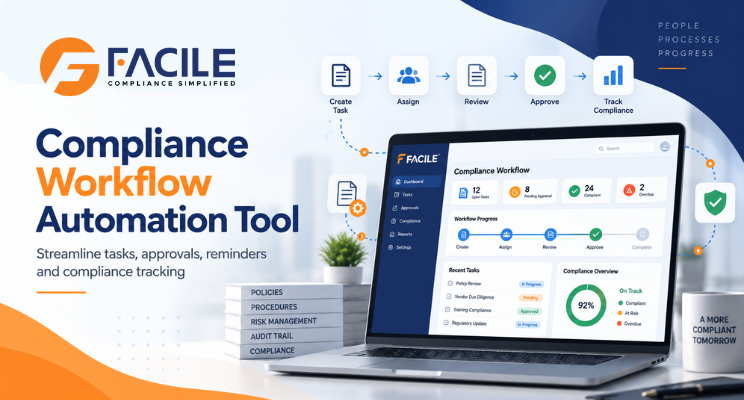
A workflow can look like:
Task Owner → Reviewer → Compliance Manager → Final Approver
The system should track each stage clearly.
Every compliance task should include:
The platform can automatically highlight activities that are nearing deadline.
Reminders can be configured for:
This reduces manual follow-ups.
When a task remains incomplete, the system can escalate it automatically.
For example:
Task Owner → Manager → Compliance Head → Senior Management
Escalation levels can depend on delay or risk severity.
Compliance tasks often require supporting documents.
The system can allow users to:
A structured document workflow can follow:
Upload → Review → Correction → Re-upload → Approval → Closure
This creates a clear audit trail.
Each task can have statuses such as:
This gives management better visibility.
Contractor compliance can involve:
The platform can route these records through submission, review, rejection and approval workflows.
Vendor workflows can include:
Payroll-related compliance can follow:
Attendance → Payroll → Minimum Wage Validation → EPF / ESIC → Payslip → Bank Payment → Wage Register
Each stage can have dependencies before the next activity is allowed.
A licence workflow can look like:
Renewal Alert → Owner Assignment → Documents → Application → Follow-Up → Approval → Renewed Licence Upload
This reduces renewal risk.
Audit workflows can include:
When non-compliance is identified, the system can route the issue through:
Observation → Owner Assigned → Corrective Action → Evidence → Verification → Closure
This ensures gaps are properly resolved.
High-risk issues may need stronger approval and escalation.
For example:
Low Risk → Standard Review
High Risk → Compliance Manager Approval
Critical Risk → Management Escalation
This makes workflow intensity proportional to risk.
Different States may have different statutory requirements.
The platform can configure workflows based on:
Compliance workflows can be managed across:
A central team can monitor all units while local teams complete their assigned activities.
The platform should maintain a full record of:
This strengthens audit readiness.
A dashboard can show:
A typical workflow can look like:
Applicability → Task Creation → Assignment → Document Submission → Review → Approval → Audit → Corrective Action → Closure
This creates a complete digital compliance lifecycle.
Every compliance activity has a clearly assigned owner.
Automated routing reduces manual email follow-ups.
Due-date reminders and escalations help prevent delays.
Evidence and supporting documents remain linked to the task.
Every action is recorded in the audit trail.
High-risk activities can be escalated immediately.
Management can monitor workflows across all business units.
Teams spend less time maintaining trackers and sending reminders.
A large organisation can structure workflows as:
Corporate → State → Location → Compliance → Owner → Reviewer → Approver → Closure
This gives local teams operational responsibility while corporate teams retain visibility.
Businesses should ensure the tool supports:
It is useful for:
FACILE ONE can help organisations automate compliance workflows through one centralised digital platform.
Businesses can use FACILE ONE to support:
Compliance processes involve multiple people, departments and approval stages.
FACILE ONE helps convert these processes into structured digital workflows.
Key capabilities include:
Businesses should evaluate whether the platform supports:
The best system should clearly answer:
What task is pending? Who owns it? What is the due date? Who needs to approve it? Is any document missing? Has the issue been closed?
A Compliance Workflow Automation Tool helps businesses replace fragmented manual follow-ups with structured digital workflows.
By automating task creation, assignment, approvals, document reviews, reminders, escalations, audits and corrective actions, organisations can improve accountability and reduce compliance delays.
For businesses operating across multiple States, locations, contractors and vendors, FACILE ONE can help create a more consistent, transparent and audit-ready compliance workflow.
It is software used to automate compliance task creation, assignment, approvals, document reviews, reminders and closure workflows.
It reduces manual follow-ups, clarifies ownership and helps prevent missed deadlines.
Yes. Tasks can be generated based on applicability, frequency and due dates.
Yes. Activities can be routed to responsible employees, departments, contractors or vendors.
Yes. Workflows can include reviewers, managers and final approvers.
Yes. Reminders can be generated for upcoming, pending and overdue activities.
Yes. Escalation can be configured based on delay, ownership or risk.
Yes. Documents can be uploaded, reviewed, rejected, corrected and approved.
Yes. Contractor attendance, payroll, EPF, ESIC, licences and supporting records can move through workflow stages.
Yes. Vendor onboarding, documents, audits and corrective actions can be automated.
Yes. Attendance, payroll, statutory records and payslips can be linked through dependency-based workflows.
Yes. Alerts, document preparation, submission and renewal closure can be managed digitally.
Yes. Audit checklists, observations, corrective actions and closure can be routed digitally.
Yes. User actions, submissions, approvals, rejections and closures can be recorded.
Yes. Workflows can be configured by State, location, law and compliance type.
Yes. FACILE ONE can support task routing, dependencies, approvals, documents, escalations, audits and corrective-action workflows.


Facile Management Services (OPC) Private Limited is committed to delivering seamlessly integrated HR and compliance solutions designed for the evolving