
Managing compliance has become increasingly complex for businesses operating in India. Organizations must coordinate labour law requirements, statutory filings, payroll processes, employee documentation, compliance deadlines, and audit records. When these activities depend heavily on spreadsheets, manual data entry, emails, and repetitive follow-ups, the likelihood of human error increases.
Even a small mistake, such as entering incorrect information, overlooking a deadline, or maintaining incomplete documentation, can lead to operational delays, rework, audit issues, or potential regulatory consequences.
Compliance automation reduces human errors by standardizing workflows, automating repetitive tasks, tracking deadlines, and improving the accuracy and visibility of compliance information.
For businesses, the objective is not simply to replace manual work. It is to build a more reliable compliance management process that supports accuracy, accountability, and efficiency.
Compliance automation is the use of software and digital workflows to manage recurring regulatory and statutory compliance activities with less manual intervention.
Depending on the platform, compliance automation tools can help organizations:
These capabilities help reduce avoidable mistakes while making compliance responsibilities easier to manage.
Manual data entry can result in incorrect figures, duplicate records, missing fields, and inconsistent information across systems. Such errors may affect payroll calculations, employee records, compliance reports, and statutory documentation.
Compliance automation can reduce repetitive data entry through integrations, reusable data, standardized forms, and validation rules.
For example, a system may flag a missing mandatory field or an invalid date before a compliance task is submitted for review.
Result: Better data consistency and fewer avoidable corrections.
Compliance teams often manage multiple obligations with different due dates, responsible persons, and supporting documents. Tracking these activities manually can become difficult as an organization grows.
Automated compliance calendars, reminders, and escalation notifications help teams identify upcoming deadlines and overdue tasks.
For businesses operating across several locations, centralized tracking can also provide better visibility into location-specific compliance responsibilities.
Result: More proactive deadline management and reduced reliance on memory.
When employees follow different procedures for the same compliance activity, organizations may experience inconsistent documentation, skipped steps, and incomplete approvals.
Compliance management software can establish standard workflows with defined task owners, checklists, review stages, and approval requirements.
For example, a recurring statutory filing workflow can require document verification before the task moves to the final approval stage.
Result: Greater process consistency and fewer missed procedural steps.
Payroll-related compliance involves employee information, salary components, statutory deductions, contribution calculations, payment records, and reporting requirements.
Manual calculations or disconnected systems can introduce inconsistencies and errors.
Where supported, integration between payroll and compliance systems can reduce repeated data entry, apply configured validation rules, and help reconcile information across records.
However, payroll calculations must still be checked against applicable laws, current thresholds, employee eligibility, and approved payroll policies.
Result: Improved coordination between payroll and compliance teams and fewer preventable data-related errors.
Missing, outdated, duplicated, or incorrectly filed documents can create challenges during compliance reviews and audits.
Digital document management enables teams to organize records, link supporting evidence to specific tasks, control access, and retrieve information more efficiently.
Depending on the software, version tracking and expiry notifications can also help teams identify documents that require review or renewal.
Result: More organized records and less time spent searching for supporting documents.
Human errors are not always caused by incorrect data. They can also occur when a task is completed without the necessary review or authorization.
Compliance automation can introduce mandatory review stages, approval rules, exception alerts, and audit trails.
For example, a task with incomplete documentation may remain pending until the required reviewer verifies the evidence.
Automation can support a maker-checker process in which one person prepares the information and another authorized person reviews it.
Result: Better accountability and earlier identification of potential errors.
When compliance information is spread across spreadsheets and emails, management may struggle to identify incomplete tasks, recurring mistakes, or emerging risks.
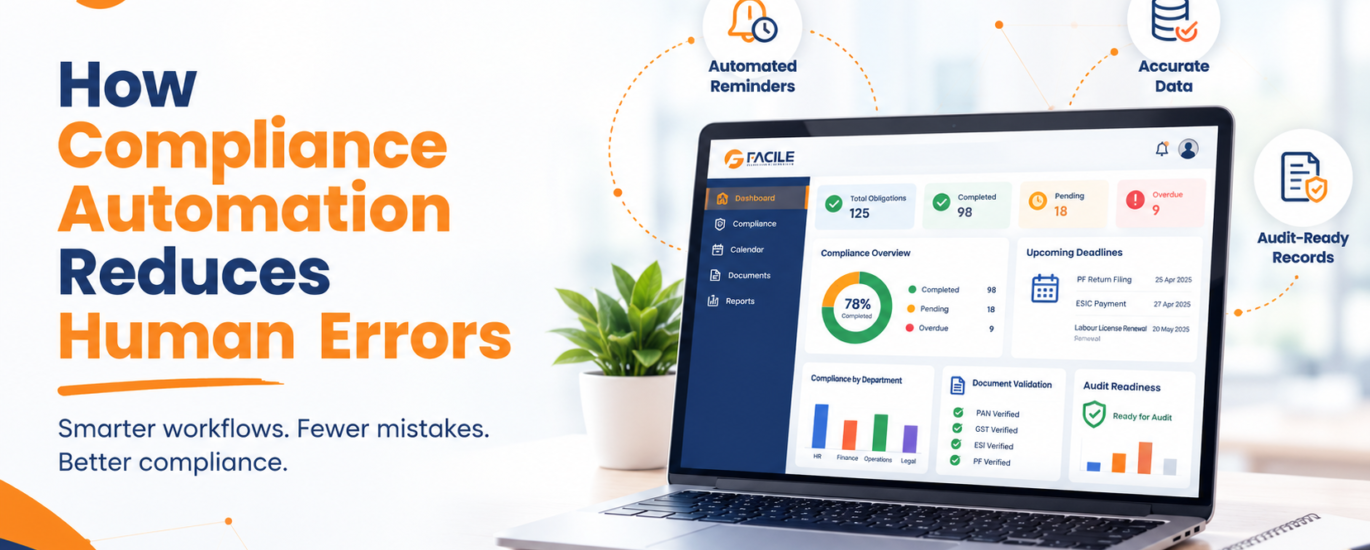
Centralized dashboards can show completed activities, overdue items, upcoming deadlines, and unresolved exceptions.
Regular reports help managers identify patterns and improve processes before similar mistakes recur.
Result: Better visibility, faster corrective action, and more informed compliance decisions.
| Activity | Manual approach | Automated approach |
|---|---|---|
| Deadline tracking | Spreadsheet updates and personal reminders | Configured calendars and notifications |
| Data validation | Manual review | Automated rules and validation checks |
| Task allocation | Emails and verbal follow-ups | Assigned owners and workflow tracking |
| Document storage | Shared folders and email attachments | Centralized, searchable records |
| Approvals | Manual email-based approval | Configured approval workflows |
| Compliance reporting | Data compilation and manual updates | Dashboard-based reporting where supported |
| Audit preparation | Collecting records from different sources | Organized evidence and available audit trails |
Automation capabilities vary by platform. A well-designed automated process still requires accurate source data, appropriate configuration, and human oversight.
Reducing repeated data entry, manual follow-ups, and avoidable corrections allows teams to spend more time on reviews, exceptions, and higher-value activities.
Centralized dashboards and status reports make it easier to identify pending tasks, missing records, and deadlines requiring attention.
Clear ownership, escalation rules, and recorded approvals help teams understand who is responsible for each compliance activity.
Standardized workflows and digital records help businesses maintain more consistent documentation and retrieve supporting evidence efficiently.
Validation rules, reminders, and exception reporting can help identify potential issues before they develop into larger operational or regulatory problems.
Organizations can adopt a structured approach to reduce errors in their compliance processes.
Step 1: Identify recurring errors. Review missed deadlines, payroll discrepancies, duplicate records, incomplete documentation, and repeated audit observations.
Step 2: Map applicable obligations. Identify relevant labour law, statutory, payroll, establishment, factory, and contractor compliance requirements based on the organization’s circumstances.
Step 3: Standardize processes. Define task owners, review procedures, approval stages, required documents, and escalation paths.
Step 4: Select suitable software. Evaluate compliance coverage, integration capabilities, validation rules, document management, reporting, security, and regulatory update processes.
Step 5: Validate data and configuration. Check employee records, establishment details, applicable requirements, deadlines, calculation rules, and access permissions before implementation.
Step 6: Train employees. Ensure HR, payroll, finance, and compliance teams understand their responsibilities and know how to handle exceptions.
Step 7: Monitor performance. Track overdue activities, error rates, correction requests, audit findings, and workflow completion to identify areas for improvement.
Businesses should evaluate compliance software based on their operational requirements rather than the number of features advertised.
Important considerations include:
A demonstration using real business scenarios can help determine whether the solution addresses the organization’s specific sources of error.
No. Compliance automation can reduce many preventable errors, but it cannot eliminate every mistake.
Incorrect source data, outdated configuration, misunderstood legal requirements, integration problems, and inappropriate user permissions can still affect outcomes. Automated reminders also cannot guarantee that an underlying compliance obligation has been correctly interpreted or completed.
Businesses should combine automation with periodic reviews, access controls, data validation, staff training, and qualified compliance oversight.
The most reliable approach is to automate repetitive and rule-based tasks while retaining human judgment for interpretation, exceptions, verification, and decision-making.
Compliance automation reduces human errors by minimizing repetitive manual work, improving data validation, standardizing workflows, tracking deadlines, organizing documents, and strengthening approval processes.
For Indian businesses managing labour law compliance, payroll requirements, statutory filings, and multiple establishments, these capabilities can improve operational consistency and provide better visibility into compliance responsibilities.
The right compliance automation solution should complement experienced professionals rather than replace them. By combining reliable software, accurate data, clearly defined responsibilities, and regular reviews, organizations can build a more efficient and dependable compliance management system.
Compliance automation reduces human errors by standardizing workflows, validating data, automating reminders, reducing repetitive data entry, and improving document and task tracking.
Automated calendars, notifications, and escalation workflows can reduce the likelihood of missed deadlines. However, organizations must configure applicable obligations correctly and ensure that responsible employees complete the required actions.
Integration, standardized data, configured calculation rules, validation checks, and reconciliation workflows can reduce repeated data entry and help identify discrepancies in payroll-related compliance information.
Yes. Small and medium-sized businesses can benefit from automated reminders, centralized records, task ownership, and standardized compliance processes, depending on their requirements and budget.
Yes. Suitable platforms can help businesses organize applicable labour law obligations, track deadlines, manage documentation, and monitor compliance tasks. Legal applicability and current requirements must still be verified.
No. Automation supports repetitive workflows and monitoring, while compliance professionals provide legal interpretation, verification, exception handling, and oversight.
It can help reduce errors involving manual data entry, duplicate records, missed reminders, incomplete documentation, inconsistent workflows, and reporting discrepancies.
Businesses can monitor indicators such as overdue tasks, data correction rates, repeated errors, audit findings, workflow completion times, and the percentage of obligations completed by their deadlines.
Useful features include validation rules, automated alerts, approval workflows, role-based access, centralized document management, audit trails, dashboards, and integration with relevant business systems.
No. Automation depends on accurate data, suitable configuration, updated requirements, reliable integrations, and appropriate human supervision. Regular reviews remain essential.


Facile Management Services (OPC) Private Limited is committed to delivering seamlessly integrated HR and compliance solutions designed for the evolving